Originally published on Medium: How to Package Java Projects in Python Tar files

Before diving into this article, I should state that — as a developer — any situation requiring placing a language A project into a language B package should occur very rarely. Most of the time it’s preferable to consider re-designing the interaction between various language components in these situations. But what if this situation is unavoidable? Open source projects such as Apache Flink and Apache Spark serve as examples. These projects have been written completely in Java but also have python modules available for those who don’t want to use the Java API.
However, Flink and Spark depend on Apache Hadoop so they don’t have a choice to write their code in a language other than Java. Also, the architecture is such that java code can’t be deployed in the cloud as an API and the python module can simply call the API as is the case with most database drivers.
Structure of the project
We must first modify the structure of the project so that the python module can easily discover the java modules. To do this we will keep the project structure as follows
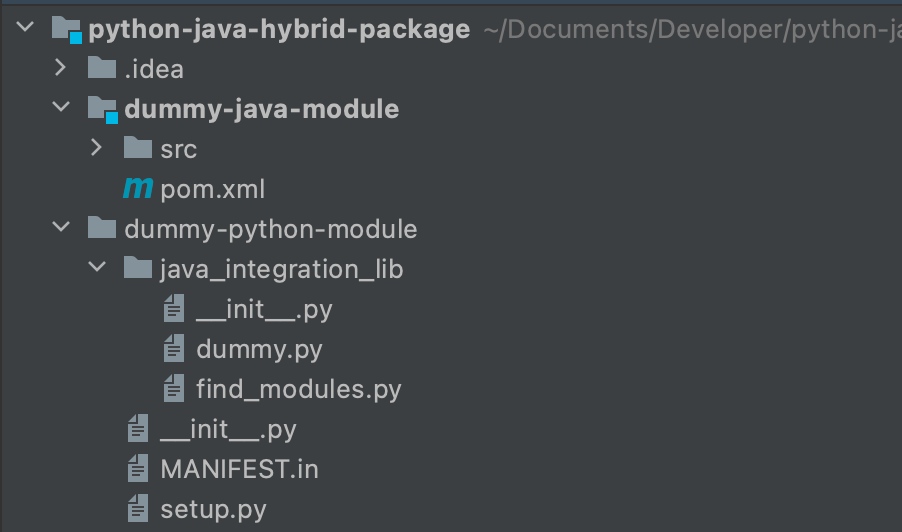
In the python project, we’ll create two files
- MANIFEST.in
- setup.py
The MANIFEST.in file contains the directories which need to be packaged in the python tar file.
The setup.py file contains the code to create the package and discover the java modules at runtime.
Create a test code
First, let’s create a java class Main.classthat just prints the class name in the stdout. We will package this class in the jar file dummy-java-module-1.0-SNAPSHOT.jar
https://medium.com/media/b17670331d95ca2cfd4d7418202c4fc8/href
Next, we’ll implement the file dummy.py which just executes this jar using the standard java command java -cp /path/to/dummy-java-module-1.0-SNAPSHOT.jar org.example.Main
https://medium.com/media/da87cbac24cd19638ae7d97074772e1d/href
We will put the dummy.py file in a directory called java_integration_lib . Now let’s take a look at how to discover the path of the jar file at runtime. We’ll be implementing thefind_modules code used in this step.
Discover Java Jar path
This is the most critical step of this process. As a developer, you can’t hardcode the path of the Jar in the dummy.py file. The path needs to be discovered at runtime.
If you are running the jar from the source directory, you can simply use the path of the dummy-java-module for running the jar.
But if the module is being run after being imported, then you need to use the path of the packaged jar. In the package, we will put the jar in /jars the directory. The code to do this is provided in the next section.
We will create a new file find_modules.py . In this file, we will implement the following code
https://medium.com/media/f67d76b714e9480446bff6719452a323/href
The code does two things -
- Check if the find_modules.py is in the source directory. If yes, simply use the path of the jar in thetarget folder.
- If the find_modules.py is not in the source directory, it is being imported as a module. In that case, we get the jar from /jars the directory inside the module’s installation directory (which is generally /usr/lib/python3.7/site-packages/ )
We also check if the jar is actually present in these directories. If it is not, then the code throws an exception.
Package the code
Now the final step is to package the code in the tar.gz file which can be installed using pip . We first compile the java module into a jar file using the command
mvn clean package
Once done, change the directory to the dummy-python-module . We write the following code in the setup.py file.
https://medium.com/media/15c95099ca2caef40aad9b75c4b1545f/href
The code can be divided into the following parts -
- Create a jars directory and copy the jar file in this directory
- Declare the packages and the corresponding files in those packages
We declare a python package java_integration_lib.jars . - Since this package doesn’t exist by default, we tell the setup module to create a directory jars for this package. Note that, this jars directory is different from the one created in the previous step.
- Then, we tell the setup to load only the *.jar files in this directory. The paths are interpreted as relative to the directory containing the package.
- Run python setup function.
For more details on how to package a simple module, you can look at the official documentation.
Now, in the MANIFEST.in the file you need to tell python that the jars the directory needs to be packaged in the python package.
You can do that by simply mentioning the command -
graft jars
Now simply run the following command
python setup.py sdist
This should create a directory dist inside the current directory and then add the python packagejava-integration-lib-1.0.0.tar.gz .
You can now install this python package using the command
pip install dist/java-integration-lib-1.0.0.tar.gz
Test the hybrid package
You can use the following code to test the package
from java_integration_lib import dummy
dummy.foo_bar()
If correctly installed you should get the output -
b’Java class org.example.Main executed!!\n’
The complete working demo code can be found in my repository — Thanks for reading!